
KatFile
If you have ever downloaded a large file from a file hosting site, you probably know how it goes. A link that should be simple to download turns into a waiting page, the speed is limited, and then you find out you have to wait again before starting another file.
That is basically where KatFile fits in.
KatFile is a file hosting and cloud storage service designed for uploading, storing and sharing files through direct download links. It is particularly useful when the file is too large or inconvenient to send through email or a normal messaging service.
I’ve been around file-hosting services long enough to know that the small details usually matter more than the headline Premium price. How fast can you download? How often can you download for free? Can you download several files at once? And what happens when something doesn’t work?
So rather than making this another short “What is KatFile?” article, this guide covers the things you are most likely to actually want to know about KatFile in 2026.
What Is KatFile?
KatFile is an online file hosting service. The basic idea is simple: upload a file, let KatFile store it online and then use the generated URL whenever you need to access or share that file.
For example, instead of trying to send a 5 GB video through email, you can upload the video to KatFile and send the other person a download link.
The same approach works for ZIP and RAR archives, software packages, photography collections, design files, audio projects and other large files.
You can use KatFile through a web browser, so there is no complicated setup required just to start downloading a file.
Who Is KatFile Actually For?
KatFile makes the most sense if you regularly deal with large files or need a simple way to share them.
Typical uses include:
- Large ZIP and RAR archives
- Video files
- Photography collections
- Software packages and installers
- Audio and music projects
- Design and creative files
- Personal archives
- Large files shared through a URL
- Files published on websites and other online platforms
It is worth separating KatFile from traditional cloud drives, though. Google Drive, OneDrive and Dropbox are often built around synchronising files between your devices. A file host is more focused on the simple process of uploading something and sharing the link.
If that is all you need, KatFile’s approach is pretty straightforward.
Do You Need a KatFile Account?
Not necessarily.
You can download KatFile files using the free download system without buying a Premium subscription. A free account is also available if you want to use KatFile more regularly.
The important thing is that free downloading comes with restrictions. Having a free account does not turn those restrictions into Premium access.
KatFile registration itself is free, so there is no need to pay simply to create an account.
Does KatFile Support Multiple Languages?
If English isn’t your preferred language, that’s not a problem with KatFile.
The website currently has 16 language options, so you can switch the interface to a language that is more comfortable for you. The list includes Turkish, German, French, Spanish, Italian, Japanese, Korean, Arabic, Russian and several other languages.
The available options are:
- فارسی (Persian)
- Русский (Russian)
- Deutsch (German)
- Français (French)
- العربية (Arabic)
- Türkçe (Turkish)
- 台語 (Taiwanese)
- Polski (Polish)
- ไทย (Thai)
- Español (Spanish)
- 日本語 (Japanese)
- Magyar (Hungarian)
- Italiano (Italian)
- Bahasa Indonesia (Indonesian)
- Nederlands (Dutch)
- 한국어 (Korean)
You can change the language directly from the KatFile website. It’s a small feature, but if you use the service regularly, having the interface in your own language makes things a little easier.
It also makes sense for a file hosting service with users from different countries. You don’t have to stick with an English interface just to upload or download a file.
KatFile Free Download: What Are the Limits?
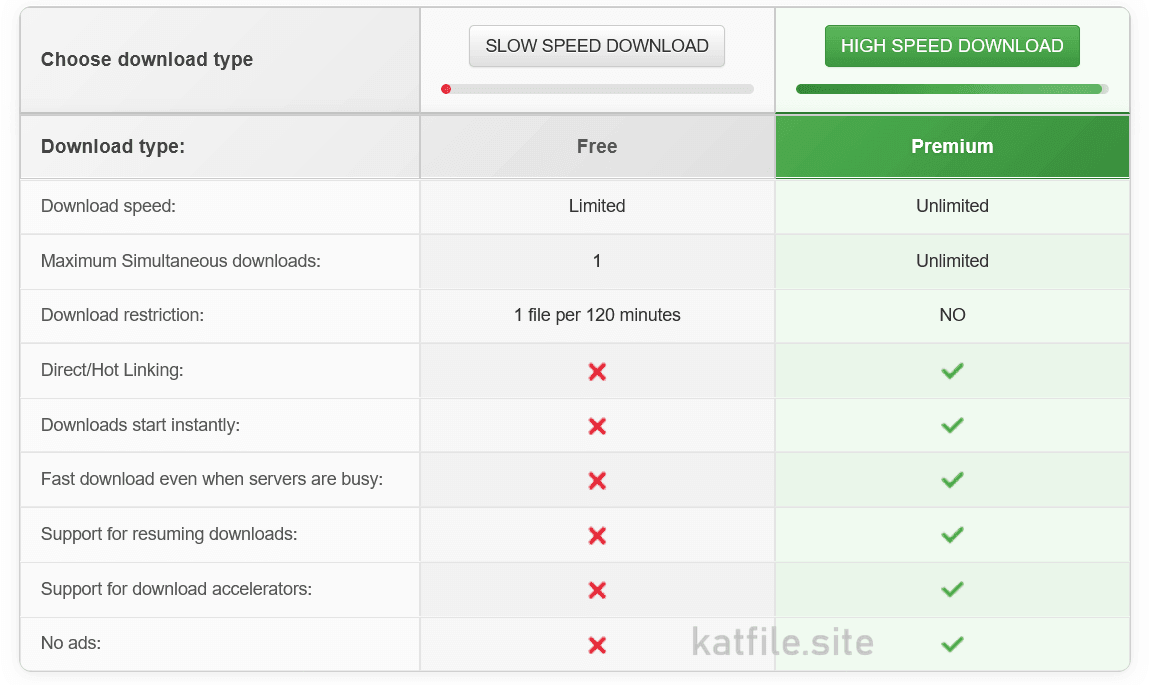
This is probably the most useful thing to understand before anything else.
KatFile’s free download system is deliberately limited. You can download files without Premium, but you cannot use the service in the same way as a Premium user.
| Feature | Free | Premium |
|---|---|---|
| Download speed | Limited | Unlimited |
| Maximum simultaneous downloads | 1 | Unlimited |
| Download restriction | 1 file per 120 minutes | No normal free-user restriction |
| Download queue | Restricted | No queue |
| Ads | May be shown | No ads |
The one file per 120 minutes rule is the part that catches people out.
It does not mean that every free download takes two hours. It means that after downloading one file, the normal free-user system does not allow you to immediately start another KatFile file.
For someone downloading one occasional file, that may not be a big deal. If you have several large files waiting, it becomes much more noticeable.
What Does KatFile Premium Change?
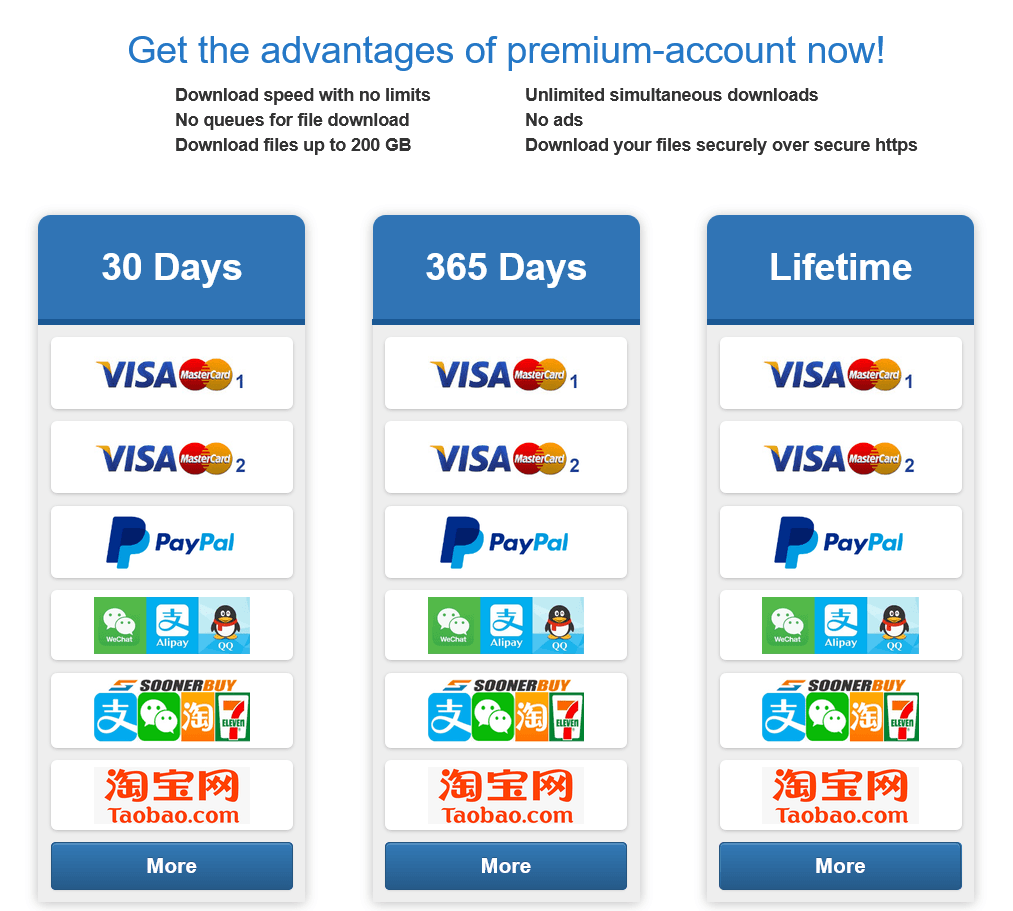
Premium is mainly about removing those restrictions.
With Premium, the normal free-user download limit is removed, simultaneous downloads are unlimited and the service does not put you through the normal free download queue.
The download comparison also lists Premium speed as unlimited.
There is one important detail behind that word, though.
Unlimited does not mean that every Premium user will automatically download at some impossible maximum speed. Your actual speed still depends on your own internet connection, network routing and the available capacity between your connection and KatFile’s servers.
In practical terms, Premium removes the artificial speed restriction placed on free downloads rather than guaranteeing a particular MB/s number.
Free vs Premium: Which Difference Matters Most?
People often focus on download speed, but I think the bigger difference is the way you can use the service.
Imagine you have six KatFile files waiting to be downloaded.
As a free user, you are dealing with the one-file-per-120-minutes restriction and one active download at a time.
With Premium, you are not dealing with that normal free-user limitation and can run multiple downloads.
That is why Premium becomes much more useful when KatFile is something you use regularly rather than once in a while.
KatFile Premium Pro and Regular
KatFile has also offered different Premium configurations, including Premium Pro and Premium Regular.
The differences can include daily traffic allowances, speed options and access to different server resources.
If you are downloading very large amounts of data every day, it is worth checking the current Premium Pro and Regular details before purchasing. These are exactly the kind of specifications that can change over time, and an old comparison from a few years ago may no longer match the current plans.
How Much Does KatFile Premium Cost?
KatFile pricing has changed over time, and promotions or payment options can also affect the final amount you see.
For that reason, I would not treat an old price table on another website as a permanent KatFile price.
The checkout page is the place to check the current price before paying.
KatFile has offered different subscription periods, including short-term and longer-term plans. If you only need Premium for a particular project or a few large downloads, starting with a shorter subscription is the sensible way to find out whether it actually fits your needs.
Is KatFile Premium Worth Paying For?
That really depends on how you use KatFile.
If you download one small file every few weeks, free access may be perfectly fine.
If you regularly download several gigabytes at a time, the calculation is different.
In that situation, you are not really paying only for speed. You are paying to remove the waiting, download-frequency and simultaneous-download restrictions that get in the way when you have several files to deal with.
For occasional use, I would stay with free access. For regular large downloads, Premium makes considerably more sense.
How to Buy KatFile Premium
The basic process is straightforward:
- Open the KatFile website.
- Log into your account if necessary.
- Open the Premium section.
- Select the plan you want.
- Choose one of the payment methods currently available.
- Complete the payment.
- Check your account and email for the Premium activation information.
KatFile’s Premium information indicates that a Premium key is sent by email after successful payment.
If you have paid but cannot find the activation message, check your spam or junk folder before trying to make another payment.
Which Payment Methods Does KatFile Accept?
This is another area where I would avoid trusting an old article too much.
KatFile has supported several payment options over the years, including traditional card payments, PayPal and cryptocurrency-based options.
Payment methods that have appeared in KatFile’s payment system include:
- Visa
- Mastercard
- PayPal
- Paysera
- Alipay
- Bitcoin
- Litecoin
- Monero
- Ethereum
- Solana
The exact list can change depending on the current payment setup, country and available gateways. If you are about to buy Premium, check the actual checkout page rather than relying on a screenshot from an old review.
How to Upload a File to KatFile
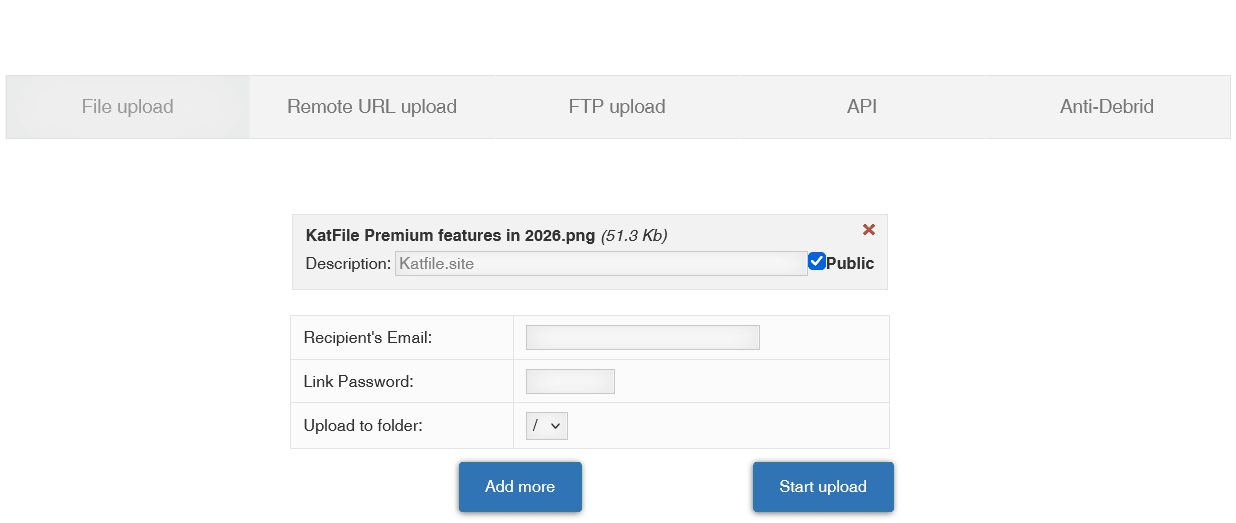
Uploading is much the same as you would expect from a file hosting service.
After signing into your account, open the upload section and select the file you want to store. Once the upload finishes, the file becomes available through your KatFile account and can be accessed using its associated information or URL.
For large uploads, connection stability matters quite a bit.
If you are uploading several gigabytes, a stable wired connection is preferable when possible. A temporary connection drop during a large upload is much more annoying than it is during a small document upload.
And one simple rule is worth remembering: don’t immediately delete your original copy just because the KatFile upload reached 100 percent.
Yes. This is one of the main reasons file hosts exist.
Once the file has been uploaded, you can share its KatFile URL with somebody else.
It can be a friend, a colleague, a customer or simply someone who needs access to the file.
For large files, this is much easier than trying to send the actual file through email or a messaging application.
How to Download From KatFile
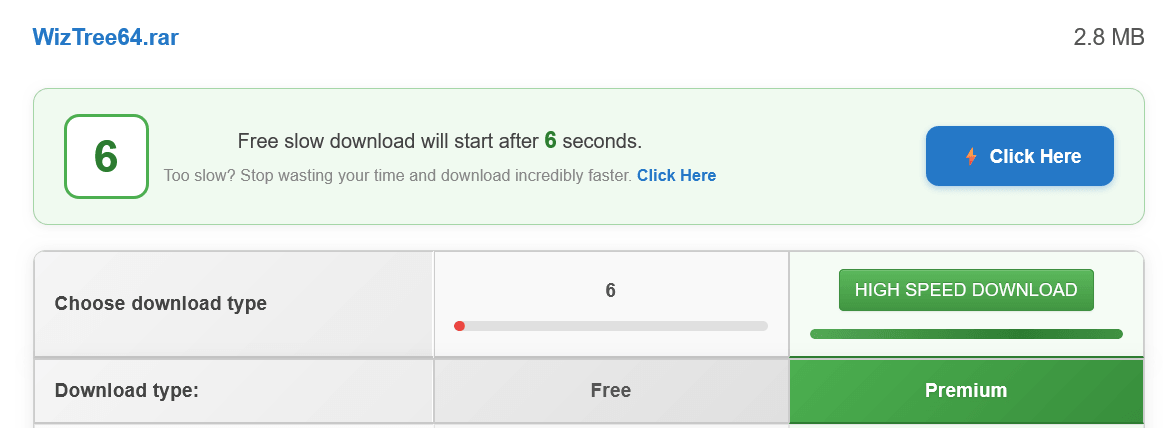
Open the KatFile URL you received and follow the download options displayed on the page.
Free users will see the normal restrictions, including the limited speed and download frequency. Depending on the current download system, you may also be asked to complete a CAPTCHA.
Premium users have a much simpler experience because the normal free-user restrictions are removed.
If the download does not start, don’t immediately assume that the file is broken. There are several other things worth checking first, especially VPN or proxy settings.
Why Is My KatFile Download So Slow?
If you are downloading as a free user, the answer is usually quite simple: the free service is speed-limited.
Premium is a different situation. If a Premium download is slower than expected, there are other possible bottlenecks.
- Your own internet connection
- Other devices using your network
- ISP routing
- The current KatFile server conditions
- VPN or proxy software
- Your browser or download manager
A useful first test is to open the same KatFile link in a normal browser without a VPN or proxy.
If it suddenly works normally, you have already narrowed down the problem considerably.
Does KatFile Work With VPNs?
This is one of the few areas where KatFile is quite clear: VPN connections are not officially supported for downloads.
That does not mean every VPN configuration will fail in exactly the same way, but it does mean that a VPN should be one of the first things you check when a KatFile download refuses to start.
Disable the VPN, open the same link again and see whether the problem disappears.
Can You Use JDownloader With KatFile?
This is one of those questions where I would avoid giving a permanent “yes” or “no”.
Download managers depend on the way a file host handles links, authentication and downloads. Those systems can change.
JDownloader or another download manager may work depending on the current KatFile setup, but if something suddenly stops working, test the same URL directly in your browser first.
If the browser download works and the download manager does not, the problem is probably compatibility between the two rather than the file itself.
Does KatFile Work With IDM?
The same basic rule applies to Internet Download Manager.
If IDM recognises the KatFile link and starts the download, great. If it does not, don’t spend an hour changing random settings before checking whether the file downloads normally in your browser.
File-hosting systems change from time to time, and a downloader that worked perfectly in the past may need an update or may temporarily lose compatibility.
Can You Download Multiple KatFile Files at Once?
Free users are limited to one simultaneous download.
Premium users are listed as having unlimited simultaneous downloads.
This is one of the most useful Premium features if you regularly have several KatFile links waiting.
It also makes the difference between Free and Premium much easier to understand than simply looking at a speed number.
Does KatFile Have a Download Queue?
Free downloading comes with restrictions, including the one-file-per-120-minutes rule.
Premium removes the normal queue restriction.
If you are only downloading one file occasionally, you may never care about this. If you are downloading a collection of large files, you will notice the difference very quickly.
Can You Use KatFile on a Phone?
Yes. The basic KatFile service can be accessed through a mobile web browser.
For simple downloads, this is usually enough. Whether a dedicated mobile application is available can change, so I would avoid downloading random “KatFile apps” or APK files from third-party websites just because they happen to appear in a search result.
If you only need to open a KatFile link and download a file, the browser is the safer and simpler option.
Does KatFile Have Unlimited Storage?
You will often see KatFile described as offering very large or unlimited storage.
I would still be careful with the word “unlimited”.
Storage is only one part of the equation. File retention rules, inactivity, account policies, copyright restrictions and the Terms of Service still apply.
If you are planning to upload a very large archive, check the current limits associated with your account rather than relying on an old “unlimited” claim.
How Long Do KatFile Files Stay Online?
This is another detail that has changed over the years.
File hosts can change their inactivity and retention policies, which is why you will sometimes find completely different answers on older websites.
The practical advice is simple: if a file is important, keep another copy somewhere else.
Even if a file host currently offers a generous retention period, there is no good reason to make one third-party service the only place where an irreplaceable file exists.
Can KatFile Be Used as a Backup?
It can certainly be one part of a backup strategy, but I would not use it as the only copy of important data.
Family photographs, business documents, source code and other irreplaceable files deserve at least one additional copy.
Think of KatFile as another storage location, not as a magic replacement for a proper backup strategy.
One copy is storage. Multiple independent copies are a backup.
Is KatFile Safe?
When someone asks whether a file host is safe, there are actually two different questions.
Is the service itself legitimate?
And is the file somebody uploaded safe to open?
Those are not the same thing.
KatFile provides the infrastructure for storing and downloading files, but that does not mean every file uploaded by another person should automatically be trusted.
If a stranger sends you an executable, an unknown installer or a suspicious archive, treat it like any other unfamiliar file on the internet.
Keep your operating system and security software updated and scan suspicious downloads before opening them.
KatFile and Copyright
Uploading a file to KatFile does not give you the right to distribute it.
If the material belongs to somebody else, you need the appropriate permission or legal basis to distribute it.
This is particularly important for people operating download websites. Publishing hundreds of links is not the same thing as having the right to distribute the files behind those links.
KatFile also provides an abuse and copyright reporting system for complaints involving infringing content.
If you are simply using KatFile for your own documents, photos or other legitimate files, this probably isn’t something you will think about very often. For webmasters, it is a different story.
KatFile for Webmasters
KatFile can be useful for websites that need to distribute large files without storing everything on their own hosting account.
Suppose you have a 10 GB archive. Putting that file directly on a small shared hosting package can consume a lot of storage and bandwidth.
With a file host, your website can simply provide the download link instead.
If you manage a lot of links, though, keep things organised.
- Keep a record of your KatFile URLs.
- Keep original copies of important files.
- Check older links from time to time.
- Do not depend entirely on one file host.
- Make sure you have the rights to distribute the files.
A provider can change its domain, pricing, download system or storage policies. Having a second option can save a lot of work if something changes later.
KatFile and Large Files
This is probably where file hosting makes the most sense.
A video project, photography archive, software collection or compressed backup can easily become several gigabytes in size.
Email was never really designed for that kind of transfer.
With KatFile, the file stays online and the recipient simply downloads it through the link.
It is a simple idea, but sometimes simple is exactly what you need.
What Should You Check Before Buying KatFile Premium?
I would do three simple things before paying for Premium.
- Make sure the files you want are actually available. There is not much point buying Premium for a file that has already been removed.
- Check your own internet connection. Premium can remove KatFile’s free speed restrictions, but it cannot make your internet connection faster than it actually is.
- Check the final checkout price. Payment methods, currencies and promotions can change.
If you are unsure, starting with a short Premium subscription is generally more sensible than immediately committing to a long-term plan.
Common KatFile Problems and Quick Fixes
| Problem | Try this first |
|---|---|
| Download is very slow | Check whether you are using the free download option. |
| You cannot start another download | Remember the free one-file-per-120-minutes restriction. |
| Download will not start | Disable your VPN or proxy and try again. |
| CAPTCHA keeps appearing | Complete the verification and try again without a VPN. |
| Premium is not recognised | Check your account and the Premium activation email. |
| Payment completed but Premium is missing | Check the payment confirmation and spam folder before paying again. |
| JDownloader or IDM stopped working | Try the same KatFile link directly in your browser. |
| A KatFile link no longer works | The file may have been removed or is no longer available. |
| Upload is slow | Check your upload bandwidth and connection stability. |
KatFile FAQ
Is KatFile free?
Yes. You can use KatFile without buying Premium. Free downloads are limited in speed and frequency.
Can I download KatFile files without Premium?
Yes. Free downloads are available, but the normal restrictions apply.
How often can I download a file for free?
The current free download restriction is one file per 120 minutes. Free users are also limited to one simultaneous download.
What does KatFile Premium remove?
Premium removes the normal free-user download restrictions. There is no standard 120-minute download restriction, simultaneous downloads are unlimited and the normal download queue is removed.
Is KatFile Premium unlimited speed?
KatFile lists Premium download speed as unlimited. Your actual speed will still depend on your own internet connection and the available capacity between your connection and KatFile’s servers.
Can I download multiple KatFile files at the same time?
Free users can have one active download at a time. Premium users are listed with unlimited simultaneous downloads.
Does KatFile support VPN downloads?
KatFile does not officially support VPN connections for downloads. If a download fails while your VPN is enabled, try again using your normal connection.
Can I use JDownloader with KatFile?
It depends on the current compatibility between JDownloader and KatFile. If it stops working, test the same link directly in your browser first.
Can I use IDM with KatFile?
The same applies to IDM. Compatibility can change as KatFile changes its download system.
Can I upload large files to KatFile?
Yes. Large-file hosting is one of the main purposes of KatFile. Exact upload limits can change, so check the current limit associated with your account.
Yes. Sharing files through URLs is one of the main functions of KatFile.
Is KatFile safe?
KatFile is a file hosting service, but you should not automatically trust every file uploaded by another user. Be particularly careful with unknown executable files and installers.
Does KatFile deal with copyright complaints?
Yes. KatFile provides an abuse and copyright reporting process for complaints about infringing material.
Can KatFile be my only backup?
I wouldn’t recommend it. Important files should have another copy stored somewhere else.
How long do KatFile files stay online?
Retention and inactivity rules can change. If a file is important, keep another copy instead of relying on a single file host indefinitely.
What payment methods does KatFile accept?
KatFile has supported cards, PayPal and several cryptocurrency and alternative payment methods. The exact options can change, so check the current checkout page before purchasing.
How is KatFile Premium activated?
After a successful payment, Premium activation information is sent by email. If you cannot find it, check your spam or junk folder before trying the payment again.
Final Thoughts on KatFile in 2026
KatFile is not particularly difficult to understand once you get past the Premium plans and download restrictions.
The basic idea is simple: upload a file, keep it online and share the link.
The free service is there for occasional use, but it comes with some very clear limitations. The most important ones are the limited download speed, one active download at a time and the one-file-per-120-minutes restriction.
Premium is aimed at people who use KatFile more seriously. The normal free-user download restriction disappears, simultaneous downloads are unlimited and the download queue is removed. Premium is also listed with unlimited download speed, although your actual speed will always depend on the connection and server capacity involved.
For someone downloading one small file every few weeks, there is little reason to pay for Premium.
For someone regularly downloading large archives, videos or other multi-gigabyte files, the difference is much easier to justify.
And that is probably the simplest way to look at KatFile in 2026: try the free option first, see how you actually use the service, and move to Premium when the free restrictions start getting in your way.
One last thing is worth remembering. KatFile can be a very convenient place to store or share files, but convenience is not the same thing as a backup strategy. If a file matters to you, keep another copy somewhere else.
More KatFile Guides
We are building KatFile.site as a practical resource for people who use KatFile and want straightforward answers without having to dig through outdated forum posts.
- KatFile Premium: Plans, Prices and Features
- KatFile Discount and Promo Codes
- How to Download From KatFile
- How to Upload Files to KatFile
- KatFile Download Problems and Fixes
- KatFile and JDownloader Guide
- KatFile Payment Methods
Note: KatFile can change prices, payment options, download limits and technical features over time. Before making a purchase, always check the information displayed on the current KatFile website and checkout page.
KatFile Free
- 50 KB/s Download Speed Limit
- 30-Second Countdown Waiting Timer
- 1 Download Stream at a time
- Mandatory Recaptcha Verification
- No Download Resume
- No IDM / JDownloader2 Multi-Threading
- 30-Day File Expiration on Inactivity
KatFile Premium 🏆
- Uncapped Gigabit Download Speed
- 0-Second Waiting Time (Instant Start)
- Zero Captcha Prompts
- Unlimited Multi-Threaded Parallel Downloads
- Full IDM & JDownloader 2 API Support
- Resume Broken & Interrupted Downloads
- Upload & Download Files up to 200 GB
- Permanent Storage While Active
- Instant USDT TRC20, Crypto & Card Checkout
Last Update: 29 September 2026 - 06:33